USB to GameCube Adapter (KB2040)
USB/Bluetooth controllers to GameCube/Wii via Adafruit KB2040.
Parts Needed
- Adafruit KB2040 (~$10)
- GameCube controller extension cable (cut to expose wires)
- USB-A female breakout or cut USB-A extension cable (for controller input)
- Hookup wire (22-26 AWG), soldering iron
Wiring
GameCube Connector
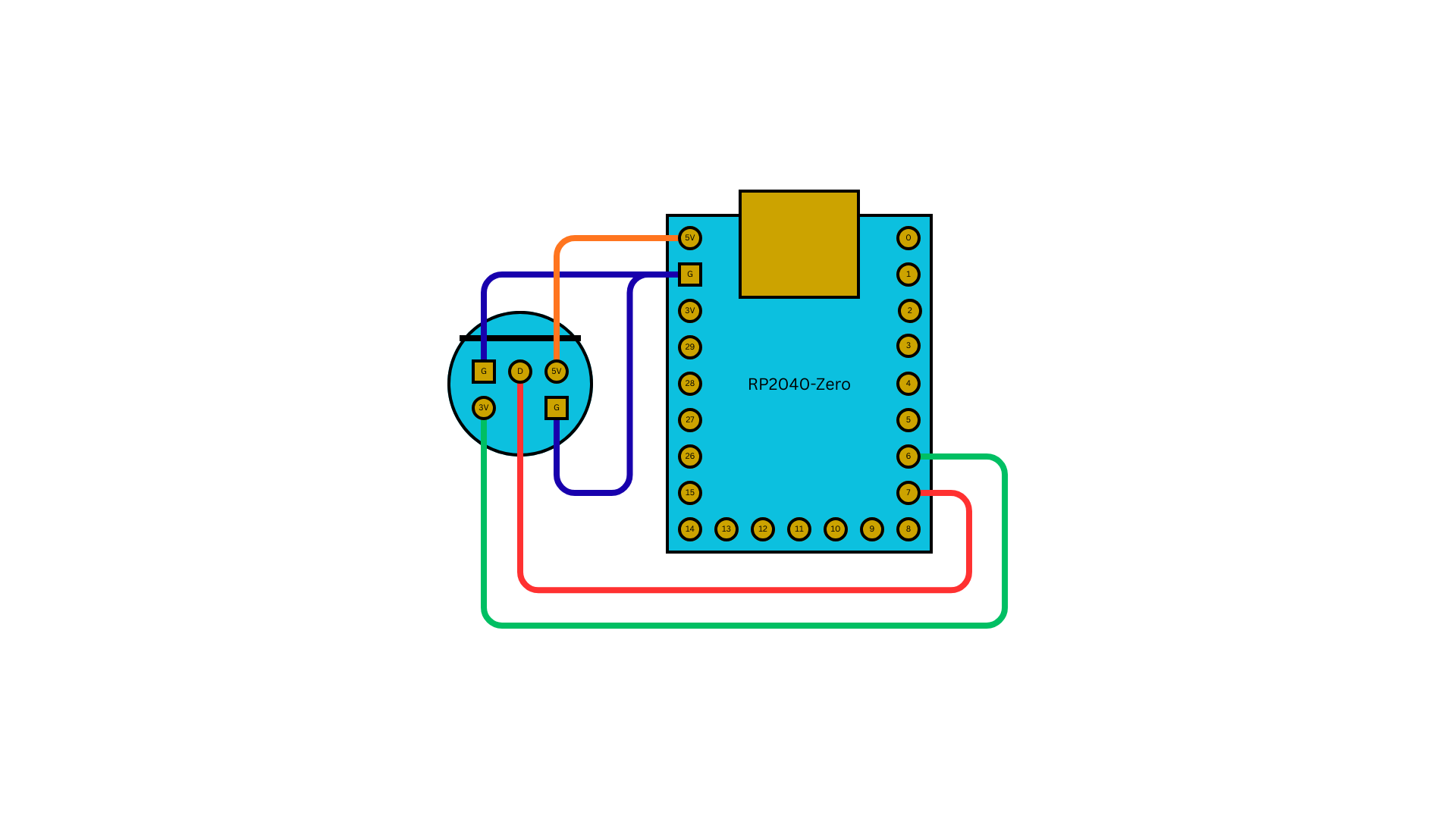
The GameCube controller port uses a proprietary connector. Cut a GC extension cable and wire the console-end plug to the KB2040.
| KB2040 Pin | GC Signal | Cable Color (typical) | Notes |
|---|---|---|---|
| GPIO 7 | Data | White or Red | Bidirectional joybus data line |
| GPIO 6 | 3.3V Sense | -- | Directly to 3.3V on KB2040 (no wire needed -- just connect GPIO 6 to 3V3) |
| 3V3 | 3.3V | -- | Powers the data line pull-up |
| GND | GND | Black | Ground |
GPIO 6 is set HIGH to signal "play mode" (GameCube console connected). When GPIO 6 reads LOW, the adapter falls back to USB device mode for configuration.
Shield pins (optional, for proper shielding):
| KB2040 Pin | Function |
|---|---|
| GPIO 4 | Shield pin L |
| GPIO 5 | Shield pin L+1 |
| GPIO 26 | Shield pin R |
| GPIO 27 | Shield pin R+1 |
USB Host Port
Wire a USB-A female connector for controller input. See Wiring Guide for details.
KB2040 uses the same pins as Pico for PIO-USB:
| KB2040 Pin | USB-A Pin | Signal |
|---|---|---|
| GPIO 16 | 3 | D+ (green) |
| GPIO 17 | 2 | D- (white) |
| 5V | 1 | VBUS (red) |
| GND | 4 | GND (black) |
Wiring Diagram
Build and Flash
# Build
make usb2gc_kb2040

# Flash (hold BOOTSEL on KB2040 while connecting USB, or double-tap reset)
make flash-usb2gc_kb2040
Output file: releases/joypad_<commit>_usb2gc_ada_kb2040.uf2
Testing
- Connect the GC cable to a GameCube or Wii console
- Plug a USB controller into the USB-A port
- The NeoPixel LED should turn solid purple (1 controller connected)
- Press a button on the controller -- the GameCube should register input
- Verify analog sticks, triggers, and rumble feedback
Important Notes
- The KB2040 runs at 130 MHz (overclocked from 125 MHz) for precise joybus timing
- All USB inputs are merged to a single GC output (MERGE_BLEND mode)
- Profile cycling: hold SELECT + D-pad Up/Down for 2 seconds
- See usb2gc app docs for profiles, keyboard mode, and feature details