usb2dc
USB/BT controllers to Dreamcast console.
Overview
Connects USB and Bluetooth controllers to a Dreamcast via the Maple Bus protocol. Supports analog triggers, rumble (Puru Puru Pack) feedback, and up to 4 players. Player slots are indicated by NeoPixel LED color.
Input
Output
Dreamcast Output -- Maple Bus PIO protocol.
Core Configuration
| Setting | Value |
|---|---|
| Routing mode | MERGE (all inputs blended to one output) |
| Player slots | 4 (fixed assignment) |
| Max USB devices | 4 |
| Profile system | None |
Key Features
- Analog triggers -- L2/R2 mapped to Dreamcast L/R analog triggers.
- Rumble -- Puru Puru Pack vibration forwarded to compatible controllers.
- Player LED colors -- Orange (P1), Blue (P2), Red (P3), Green (P4).
Supported Boards
| Board | Build Command | Notes |
|---|---|---|
| KB2040 | make usb2dc_kb2040 |
Maple pins: GPIO 2/3 |
| RP2040-Zero | make usb2dc_rp2040zero |
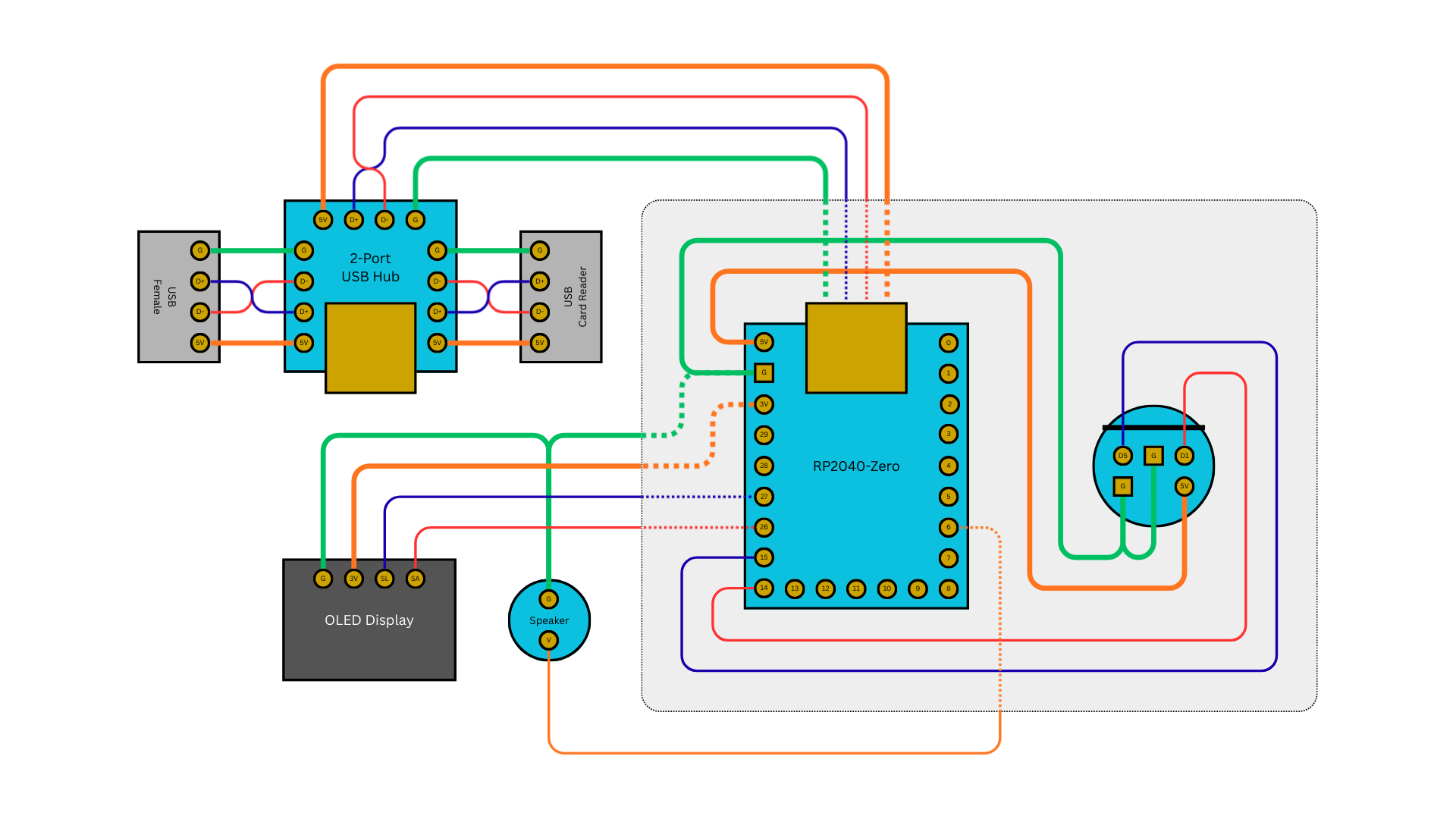
Maple pins: GPIO 14/15 (USB4Maple-compatible) |
The RP2040-Zero build uses the same pinout as USB4Maple, so existing USB4Maple hardware can run Joypad OS as a drop-in replacement.
RP2040-Zero Wiring
Build and Flash
Troubleshooting
Controller not detected by console: - Check Maple Bus cable connections (SDCKA, SDCKB, 5V, GND). - Verify the data pin assignments match your board variant (KB2040 uses GPIO 2/3, RP2040-Zero uses GPIO 14/15).
Rumble not working: - Only compatible USB/BT controllers support Puru Puru Pack feedback. - Check USB power supply -- rumble requires more current.
Analog triggers not responding: - Verify your input controller has analog L2/R2 triggers (digital-only triggers map to full press).