usb23do
USB/BT controllers to 3DO Interactive Multiplayer.
Overview
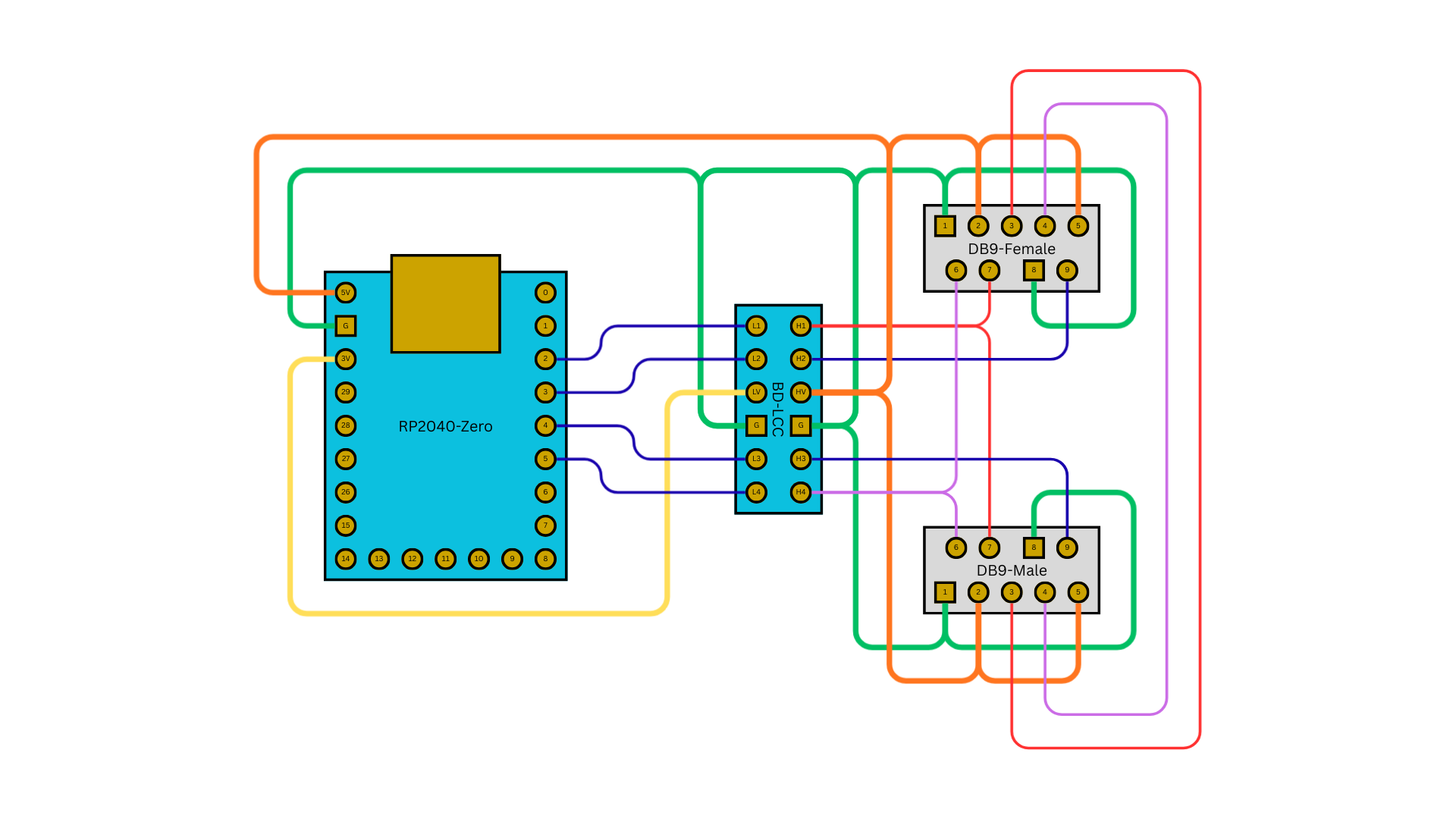
Connects USB and Bluetooth controllers to a 3DO console via the PBUS daisy-chain protocol. Supports up to 8 players, USB mouse as a 3DO mouse, extension passthrough for native 3DO controllers, and multiple button mapping profiles. Requires a bidirectional 3.3V-to-5V level shifter.
Input
Output
3DO Output -- PBUS serial PIO protocol with daisy-chain support.
Core Configuration
| Setting | Value |
|---|---|
| Routing mode | SIMPLE (1:1 controller to PBUS slot) |
| Player slots | 8 (shift on disconnect) |
| Max USB devices | 8 |
| Profile system | 3 profiles |
Profiles
Hold Select for 2 seconds, then press D-Pad Up/Down to cycle.
| Profile | Description |
|---|---|
| Default | SNES-style layout (B1=B, B2=C, B3=A) |
| Fighting | Way of the Warrior, SFII (face buttons = punches, shoulders = kicks) |
| Shooter | Doom, PO'ed (shoulders = fire, face = movement actions) |
See the Profiles (Detailed) section below for full button mapping tables per profile.
Key Features
- 8-player support -- Up to 8 USB controllers via USB hub, each mapped to a PBUS slot.
- Extension passthrough -- Native 3DO controllers connect in series after the USB adapter.
- Mouse support -- USB mouse emulates 3DO mouse for Myst, The Horde, Lemmings.
- Device types -- Joypad (2-byte), Joystick (9-byte), and Mouse (4-byte) PBUS reports.
Supported Boards
| Board | Build Command |
|---|---|
| RP2040-Zero | make usb23do_rp2040zero |
Build and Flash
Wiring Diagram
Profiles (Detailed)
Default Profile (SNES-Style)
| USB Input | 3DO Output | Notes |
|---|---|---|
| B1 (Cross/B) | B | Middle button |
| B2 (Circle/A) | C | Bottom button |
| B3 (Square/X) | A | Top button |
| B4 (Triangle/Y) | (disabled) | |
| L1 (LB/L) | L | Left shoulder |
| L2 (LT/ZL) | L | Left shoulder (OR) |
| R1 (RB/R) | R | Right shoulder |
| R2 (RT/ZR) | R | Right shoulder (OR) |
| S1 (Select) | X | Stop button |
| S2 (Start) | P | Play/Pause |
| D-Pad | D-Pad | Direct mapping |
| Left Stick | D-Pad | Stick to D-pad |
Fighting Profile
Optimized for Way of the Warrior, Super Street Fighter II Turbo:
| USB Input | 3DO Output | Notes |
|---|---|---|
| B1 (Cross/B) | B | Light Punch |
| B2 (Circle/A) | C | Medium Punch |
| B3 (Square/X) | A | Heavy Punch |
| B4 (Triangle/Y) | P | Light Kick |
| L1 (LB/L) | L | Medium Kick |
| R1 (RB/R) | R | Heavy Kick |
| S1 (Select) | X | Stop |
| S2 (Start) | P | Pause |
Shooter Profile
Optimized for Doom, PO'ed, Killing Time:
| USB Input | 3DO Output | Notes |
|---|---|---|
| B1 (Cross/B) | C | Jump |
| B2 (Circle/A) | B | Action |
| B3 (Square/X) | A | Weapon Switch |
| B4 (Triangle/Y) | X | Special |
| L1/L2 | L | Primary Fire |
| R1/R2 | R | Secondary Fire |
| S2 (Start) | P | Pause |
Compatible Hardware
3DO Consoles
- Panasonic FZ-1 / FZ-10
- Goldstar GDO-101M / GDO-202M
- Sanyo TRY 3DO
- Creative Labs 3DO Blaster (PC card)
Troubleshooting
Controller not detected: - Check PBUS cable connections, especially 5V power. - Verify CLK and DATA pin assignments. - Ensure the level shifter is wired correctly (all signal lines need 3.3V-to-5V shifting).
Multiple players not working: - Verify the USB hub is powered. - Check total device count (max 8). - Try connecting one controller at a time.
Extension passthrough not working: - Check the DATA_IN connection for the daisy chain. - The native 3DO controller must be at the end of the chain.
Mouse not working: - Verify the game supports the 3DO mouse. - Check that the USB mouse is detected. - Try a different USB mouse model.