NEOGEO / SuperGun Adapter
USB controller adapter for NEOGEO consoles and SuperGun with profiles, single player.
Features
Controller Profiles
Switch between pre-configured profiles to match different gamepads and playstyles:
- Default - Standard 1L6B Layout
- Type A - Standard 1L6B Layout at Right
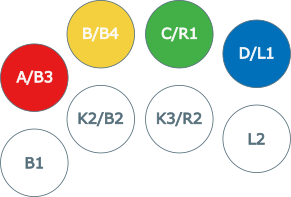
- Type B - NEOGEO MVS 1L4B
- Type C - NEOGEO MVS Big Red
- Type D - NEOGEO MVS U4
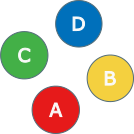
- Pad A - NEOGEO Pad Type 1 (Classic Diamond)
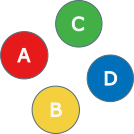
- Pad B - NEOGEO Pad Type 2 (KOF/Fighting Style)
Switching Profiles: 1. Hold Select for 2 seconds 2. Press D-Pad Up to cycle forward 3. Press D-Pad Down to cycle backward 4. Controller rumbles and LED flashes to confirm 5. Profile saves to flash memory (persists across power cycles)
Button Mappings
Default Profile
Standard arcade mapping for 1L6B in 1L8B fightsticks:
| USB Input | NEOGEO/SuperGun Output |
|---|---|
| B1 (Cross/A) | B4 / K1 / D |
| B2 (Circle/B) | B5 / K2 / Select |
| B3 (Square/X) | B1 / P1 / A |
| B4 (Triangle/Y) | B2 / P2 / B |
| L1 (LB/L) | - (disabled) |
| R1 (RB/R) | B3 / P3 / C |
| L2 (LT/ZL) | - (disabled) |
| R2 (RT/ZR) | B6 / K3 |
| S1 (Select) | Coin |
| S2 (Start) | Start |
| D-Pad | D-Pad |
| Left Stick | D-Pad |
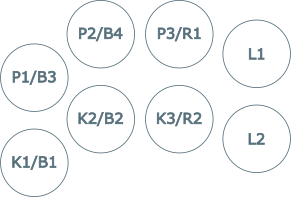
Type A Profile
Arcade mapping for 1L6B in 1L8B fightsticks aligned to right:
| USB Input | NEOGEO/SuperGun Output |
|---|---|
| B1 (Cross/A) | - (disabled) |
| B2 (Circle/B) | B4 / K1 / D |
| B3 (Square/X) | - (disabled) |
| B4 (Triangle/Y) | B1 / P1 / A |
| L1 (LB/L) | B3 / P3 / C |
| R1 (RB/R) | B2 / P2 / B |
| L2 (LT/ZL) | B6 / K3 |
| R2 (RT/ZR) | B5 / K2 / Select |
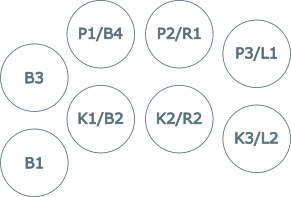
Type B Profile
NEOGEO MVS mapping 1L4B in 1L8B fightsticks:
| USB Input | NEOGEO/SuperGun Output |
|---|---|
| B1 (Cross/A) | B1 / P1 / A |
| B2 (Circle/B) | B5 / K2 / Select |
| B3 (Square/X) | B2 / P2 / B |
| B4 (Triangle/Y) | B3 / P3 / C |
| L1 (LB/L) | - (disabled) |
| R1 (RB/R) | B4 / K1 / D |
| L2 (LT/ZL) | - (disabled) |
| R2 (RT/ZR) | B6 / K3 |
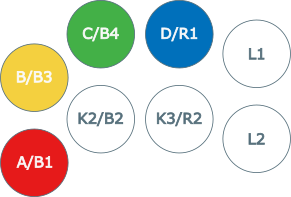
Type C Profile
NEOGEO MVS Big Red mapping in 1L8B fightsticks:
| USB Input | NEOGEO/SuperGun Output |
|---|---|
| B1 (Cross/A) | B1 / P1 / A |
| B2 (Circle/B) | B5 / K2 / Select |
| B3 (Square/X) | - (disabled) |
| B4 (Triangle/Y) | B2 / P2 / B |
| L1 (LB/L) | B4 / K1 / D |
| R1 (RB/R) | B3 / P3 / C |
| L2 (LT/ZL) | - (disabled) |
| R2 (RT/ZR) | B6 / K3 |
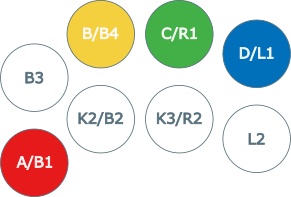
Type D Profile
NEOGEO MVS U4 mapping in 1L8B fightsticks:
| USB Input | NEOGEO/SuperGun Output |
|---|---|
| B1 (Cross/A) | B5 / K2 / Select |
| B2 (Circle/B) | B6 / K3 |
| B3 (Square/X) | B1 / P1 / A |
| B4 (Triangle/Y) | B2 / P2 / B |
| L1 (LB/L) | B4 / K1 / D |
| R1 (RB/R) | B3 / P3 / C |
| L2 (LT/ZL) | - (disabled) |
| R2 (RT/ZR) | - (disabled) |
Pad A Profile
NEOGEO AES pad mapping aligned to classic diamond controllers:
| USB Input | NEOGEO/SuperGun Output |
|---|---|
| B1 (Cross/A) | B1 / P1 / A |
| B2 (Circle/B) | B2 / P2 / B |
| B3 (Square/X) | B3 / P3 / C |
| B4 (Triangle/Y) | B4 / K1 / D |
| L1 (LB/L) | B6 / K3 |
| R1 (RB/R) | B5 / K2 / Select |
| L2 (LT/ZL) | - (disabled) |
| R2 (RT/ZR) | - (disabled) |
Pad B Profile
NEOGEO AES pad mapping to KOF style in controllers:
| USB Input | NEOGEO/SuperGun Output |
|---|---|
| B1 (Cross/A) | B2 / P2 / B |
| B2 (Circle/B) | B4 / K1 / D |
| B3 (Square/X) | B1 / P1 / A |
| B4 (Triangle/Y) | B3 / P3 / C |
| L1 (LB/L) | B6 / K3 |
| R1 (RB/R) | B5 / K2 / Select |
| L2 (LT/ZL) | - (disabled) |
| R2 (RT/ZR) | - (disabled) |
Hardware Requirements
- Board: Adafruit KB2040 (default), RP2040-Zero, Pico, QT Py
- Protocol: Parallel Active-Low logic direct to GPIO
- Connector: NEOGEO DB15 cable or adapter
Wiring (KB2040)
| KB2040 | Pico | RP2040 Zero | DB15 Port | NEOGEO Function |
|---|---|---|---|---|
| GND | GND | GND | Pin 1 | Ground |
| GPIO 7 | GPIO 7 | GPIO 2 | Pin 2 | Button 6 / K3 |
| GPIO 6 | GPIO 6 | GPIO 3 | Pin 3 | S1 (Coin) |
| GPIO 5 | GPIO 5 | GPIO 4 | Pin 4 | Button 4 / D |
| GPIO 4 | GPIO 4 | GPIO 27 | Pin 5 | Button 2 / B |
| GPIO 3 | GPIO 3 | GPIO 28 | Pin 6 | Right |
| GPIO 2 | GPIO 2 | GPIO 29 | Pin 7 | Down |
| 5V | 5V | 5V | Pin 8 | +5V Power |
| N/C | N/C | N/C | Pin 9 | - |
| GPIO 20 | GPIO 20 | GPIO 9 | Pin 10 | Button 5 / Select |
| GPIO 18 | GPIO 18 | GPIO 10 | Pin 11 | S2 (Start) |
| GPIO 26 | GPIO 26 | GPIO 11 | Pin 12 | Button 3 / C |
| GPIO 27 | GPIO 27 | GPIO 12 | Pin 13 | Button 1 / A |
| GPIO 28 | GPIO 28 | GPIO 13 | Pin 14 | Left |
| GPIO 29 | GPIO 19 | GPIO 14 | Pin 15 | Up |
Note: This implementation uses Open Drain logic to prevent voltage collisions between 5V and 3.3V, ensuring the safety of your NeoGeo or Arcade PCBs.
- Basic Protection: To mitigate electrical risks, add a 1N4148 diode with the cathode (the stripe) facing the RP2040.
- Maximum Safety: To eliminate all risks, it is recommended to use level shifters such as the TXS0108E (bidirectional) or the 74LVC245A (unidirectional).
RP2040 Zero Wiring Reference
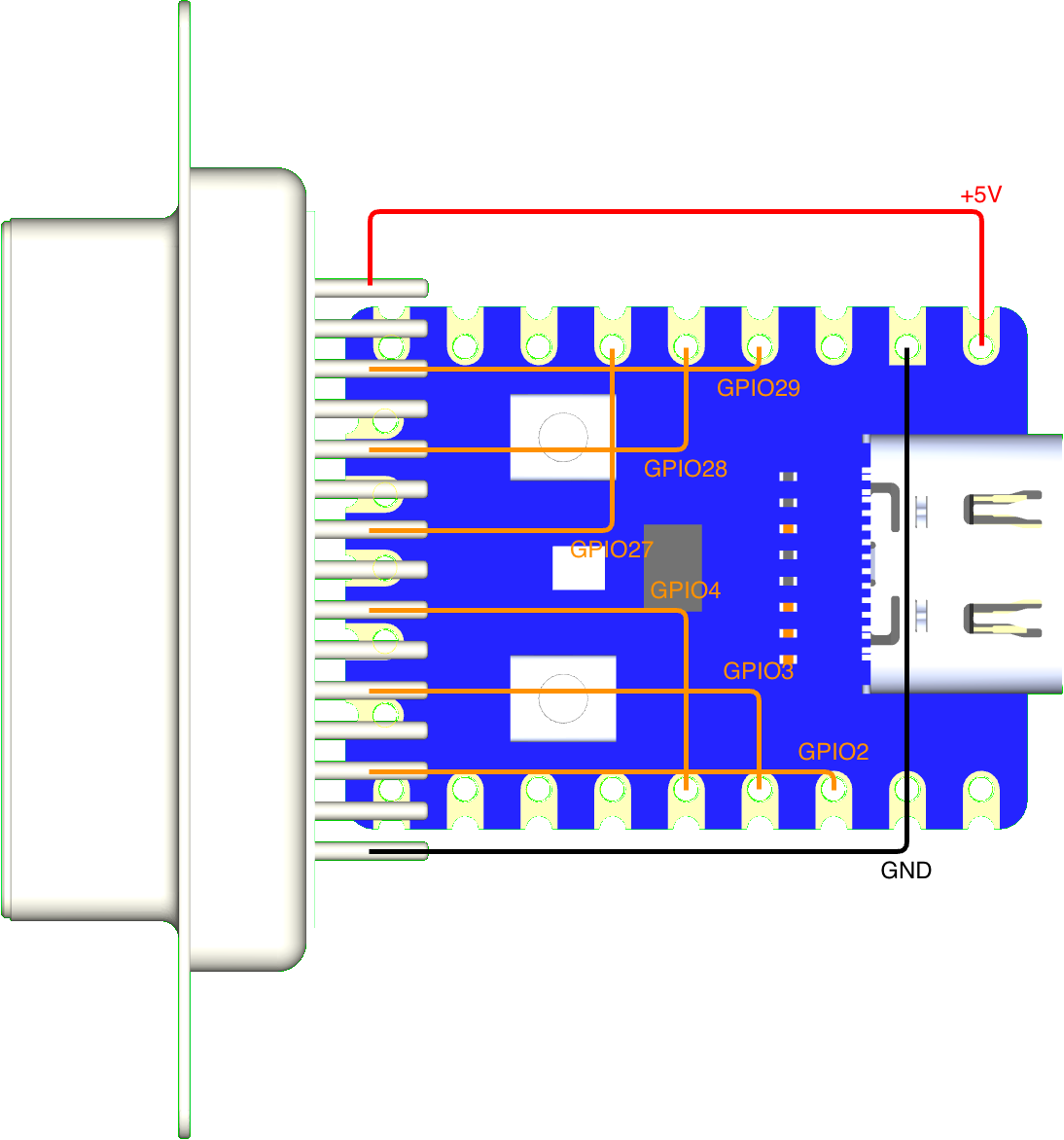
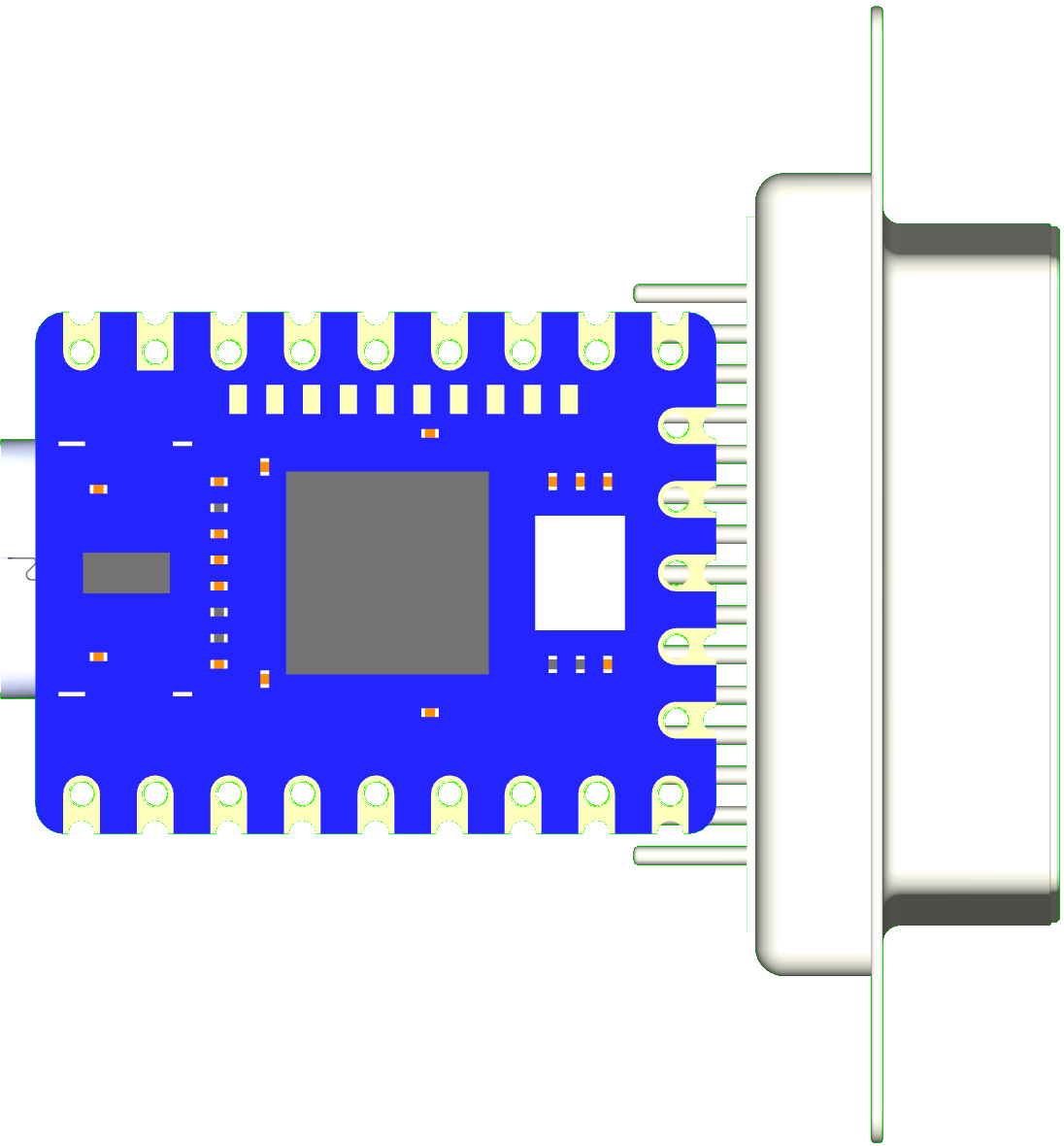
It is possible to connect the RP2040 Zero directly to a DB15 connector by taking advantage of the board design.
Installation Steps:
-
Solder pins 10 through 15 of the DB15 directly to GPIO pins 9 through 14 on the bottom of the RP2040 Zero. To minimize risk, solder to the base of the DB15 pins; it is possible to solder in the center, but it requires special care.
-
Connect the remaining GPIOs, along with the +5V and GND lines, using wires as shown in the front and back reference images.
| Front | Back |
|---|---|
 |
 |
Technical Details
Latency Testing
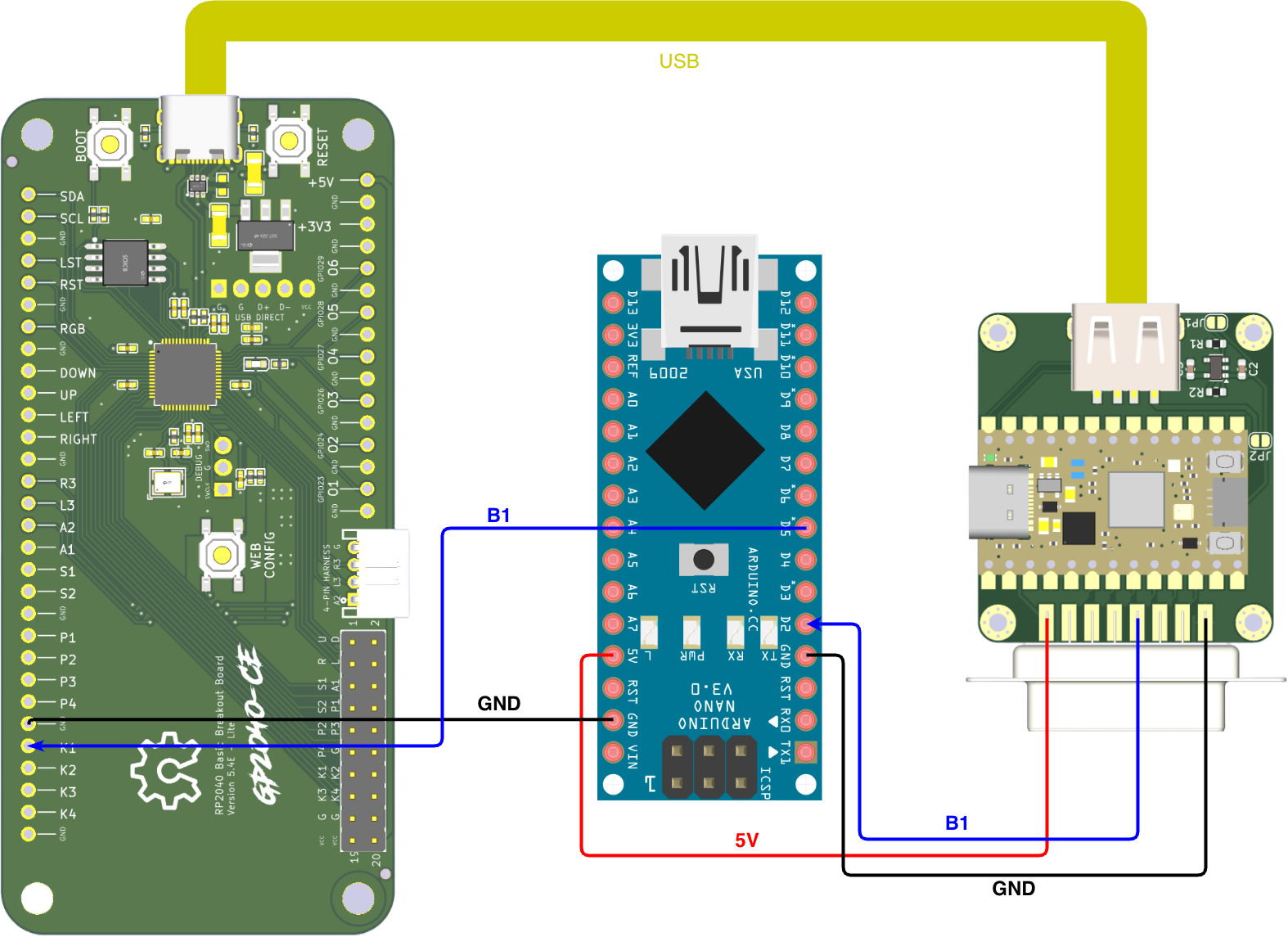
Input latency is tested using the MiSTer FPGA Input Latency methodology, but adapted for usb2neogeo use. While the original methodology measures input lag from USB gamepads on a MiSTer FPGA, this setup replaces the MiSTer with the adapter itself.
The process uses an Arduino script that triggers an input on the gamepad via PIN 5. In the original MiSTer setup, the core catches the input and sends a response back to the Arduino via the User Port to PIN 2, triggering an interrupt to calculate the elapsed time.
With this usb2neogeo, the MiSTer is not required. The adapter receives the USB gamepad inputs and routes them directly to the NEOGEO port. This output is then used as the interrupt signal for the Arduino to measure the precise delay between the physical button "press" and the adapter's output.
Test Results
Note: Outliers filtered using 0.02 lower and 0.995 upper quantiles to ensure statistical accuracy.
| Setup (Input > Output) | Min (ms) | Avg (ms) | Max (ms) | Std Dev |
|---|---|---|---|---|
| GP2040 (PS3) > joypad-usb2neogeo | 0.24 | 0.74 | 1.25 | 0.28 |
| GP2040 (PS4) > joypad-usb2neogeo | 0.24 | 0.73 | 1.26 | 0.28 |
| GP2040 (SW) > joypad-usb2neogeo | 0.18 | 0.67 | 1.18 | 0.28 |
| GP2040 (360) > joypad-usb2neogeo | 0.18 | 0.67 | 1.19 | 0.28 |
Full results can be found in the Google Sheet.
Profile Persistence
- Uses last 4KB of flash memory
- Debounced 5 seconds after profile change (reduces wear)
- Approximately 100K write cycles available
- Survives firmware updates (by design)
Troubleshooting
Controller not detected: - Check NEOGEO cable connections - Ensure the DB15 cable is providing 5V on Pin 8 and GND on Pin 1. - Check data pin assignment in firmware
Profile not saving: - Wait 5 seconds after profile change for flash write - Check that flash memory isn't corrupted - Reflash firmware if needed
Product Links
- GitHub Releases - Latest firmware