GameCube / Wii Adapter
USB controller adapter for GameCube and Wii consoles with profiles, rumble, and keyboard mode.
Features
Controller Profiles
Switch between optimized button mappings for different games:
- Default - Standard mapping for most games
- SNES - SNES-style layout (L/R as full press, Select→Z)
- SSBM - Super Smash Bros. Melee competitive
- MKWii - Mario Kart Wii optimized
- Fighting - Fighting game layout
Switching Profiles: 1. Hold Select for 2 seconds 2. Press D-Pad Up to cycle forward 3. Press D-Pad Down to cycle backward 4. Controller rumbles and LED flashes to confirm 5. Profile saves to flash memory (persists across power cycles)
Keyboard Mode
Use a USB keyboard as a GameCube keyboard:
- Press Scroll Lock or F14 to toggle keyboard mode
- LED indicator shows when active
- All standard keys mapped to GameCube keyboard protocol
- Works with Phantasy Star Online and other keyboard-compatible games
Copilot Mode
Combine multiple USB controllers into a single GameCube controller:
- Connect multiple controllers to USB hub
- All inputs merge into one controller output
- Perfect for accessibility or assisted gameplay
- Each player can control different buttons simultaneously
Rumble Support
Full rumble/vibration feedback for compatible controllers: - Xbox controllers (all generations) - PlayStation DualShock 3/4/5 - Switch Pro Controller - 8BitDo controllers with rumble
Adaptive Triggers (DualSense)
DualSense controllers can use adaptive trigger threshold: - L2/R2 analog values mapped to GameCube L/R - Configurable threshold per profile
Button Mappings
Default Profile
Standard mapping for most games:
| USB Input | GameCube Output |
|---|---|
| B1 (Cross/A) | B |
| B2 (Circle/B) | A |
| B3 (Square/X) | Y |
| B4 (Triangle/Y) | X |
| L1 (LB/L) | - (disabled) |
| R1 (RB/R) | Z |
| L2 (LT/ZL) | L (analog) |
| R2 (RT/ZR) | R (analog) |
| S1 (Select) | - (profile switch) |
| S2 (Start) | Start |
| D-Pad | D-Pad |
| Left Stick | Control Stick |
| Right Stick | C-Stick |
SNES Profile
For SNES-style controllers (L/R as full press):
| USB Input | GameCube Output |
|---|---|
| L1 (LB) | L (digital + full analog) |
| R1 (RB) | R (digital + full analog) |
| S1 (Select) | Z |
| Other | Same as Default |
SSBM Profile
Super Smash Bros. Melee competitive mapping:
| USB Input | GameCube Output | Notes |
|---|---|---|
| B1 (Cross/A) | B | Attack |
| B2 (Circle/B) | A | Jump |
| B3 (Square/X) | Y | Jump |
| B4 (Triangle/Y) | X | Jump |
| L1 (LB) | Z | Grab |
| R1 (RB) | X | Short hop aerial |
| L2 (LT @ 88%) | L (17% analog) | Light shield |
| R2 (RT @ 55%) | L+R | Quit combo |
| Left Stick | 85% sensitivity | Precision movement |
Key Features: - Light shield at 17% on L trigger - Quick quit combo (L+R+Start) on RT - Multiple jump buttons (A, X, Y, RB) - 85% stick sensitivity for precise movement
MKWii Profile
Mario Kart Wii optimized:
| USB Input | GameCube Output | Notes |
|---|---|---|
| L1 (LB) | D-Up | Wheelies/tricks |
| R1 (RB) | R (full analog) | Drift |
| R2 (RT) | Z (instant) | Item throw |
| Other | Same as Default |
Fighting Profile
2D fighting game layout:
| USB Input | GameCube Output | Notes |
|---|---|---|
| L1 (LB) | C-Up | Macro input |
| R1 (RB) | Z | |
| Right Stick | Disabled | Prevents accidental input |
| Other | Same as Default |
Hardware Requirements
- Board: Adafruit KB2040 (default), RP2040-Zero, Pico, QT Py
- Clock: 130MHz (overclocked for joybus timing)
- Protocol: GameCube joybus via PIO
- Connector: GameCube controller cable
Wiring Diagram (RP2040-Zero)
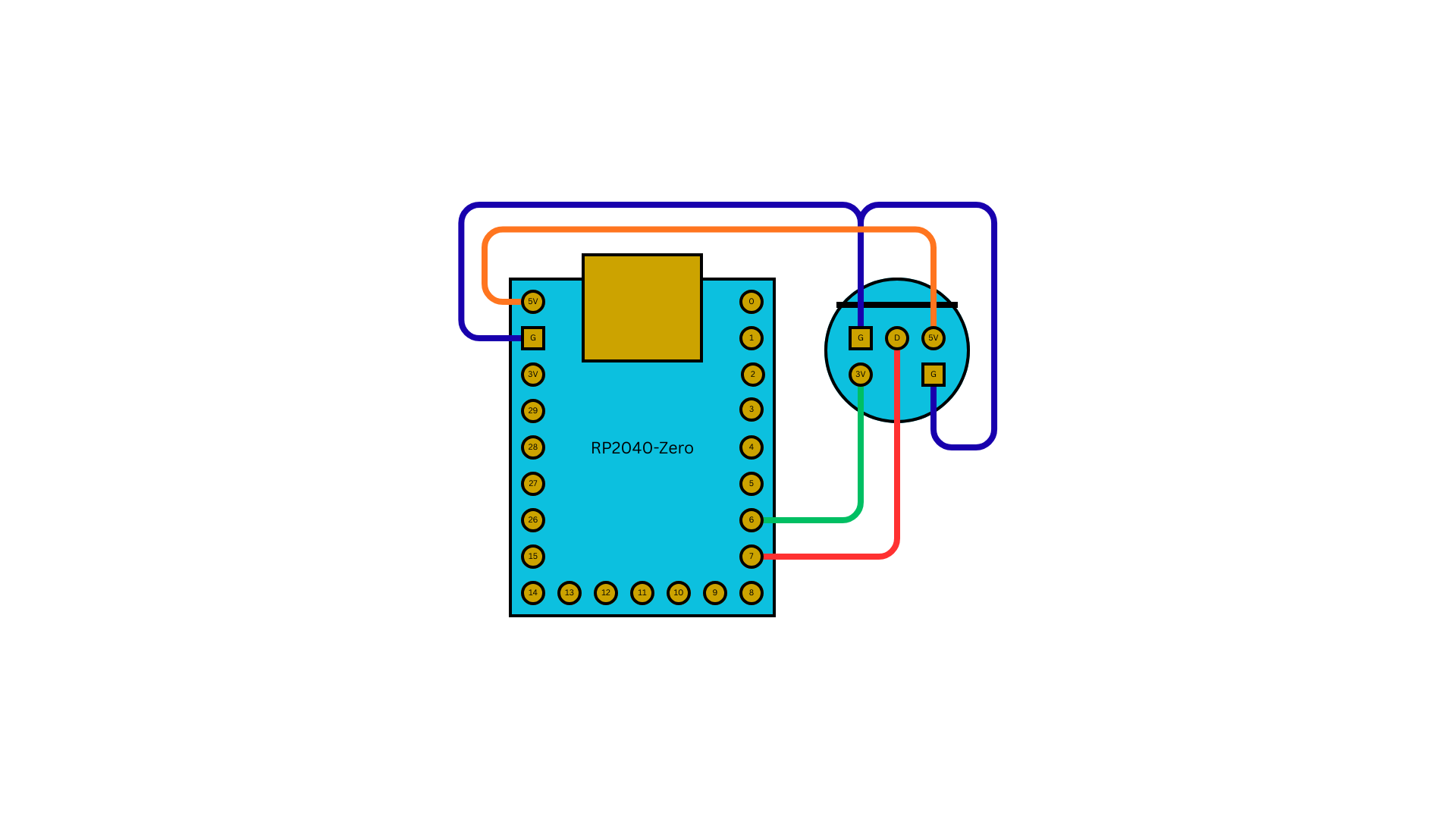
| RP2040-Zero | GameCube Port |
|---|---|
| 5V | 5V |
| GND | GND |
| 3V3 | 3.3V |
| GPIO 7 | Data |
GameCube Controller Cable Pinout
Pin 1: VCC (5V)
Pin 2: Data (bidirectional)
Pin 3: GND
Pin 4: GND
Pin 6: 3.3V (optional, some boards)
Technical Details
Profile Persistence
- Uses last 4KB of flash memory
- Debounced 5 seconds after profile change (reduces wear)
- Approximately 100K write cycles available
- Survives firmware updates (by design)
Dual-Core Architecture
- Core 0: USB polling, input processing, main loop
- Core 1: Joybus protocol (timing-critical)
Joybus Protocol
- 130MHz clock required for timing accuracy
- Bidirectional single-wire protocol
- ~6μs bit period
- Uses joybus-pio library
Troubleshooting
Controller not detected: - Check GameCube cable connections - Verify 3.3V power and ground pins - Check data pin assignment in firmware
Rumble not working: - Only compatible controllers support rumble - Check USB power supply (rumble requires more current) - Use powered USB hub for multiple controllers
Profile not saving: - Wait 5 seconds after profile change for flash write - Check that flash memory isn't corrupted - Reflash firmware if needed
Keyboard mode not activating: - Press Scroll Lock or F14 key - Check LED indicator - Some keyboards may not be compatible
Stick drift or incorrect calibration: - GameCube expects centered at 128 - USB controllers are auto-calibrated - Check for physical stick drift
Product Links
- GC USB Adapter - Pre-built hardware
- GitHub Releases - Latest firmware