3DO Interactive Multiplayer Adapter
USB controller adapter for 3DO with 8-player support and extension passthrough.
Features
Multi-Player Support (Up to 8 Players)
Full 8-player support via 3DO's PBUS daisy chain protocol: - Connect up to 8 USB controllers via USB hub - Each controller maps to a PBUS slot - Automatic player assignment on connection - Players shift on disconnect (SHIFT mode)
Controller Types
Joypad (Standard Controller): - D-pad, A, B, C buttons - L, R shoulder buttons - X (Stop), P (Play/Pause)
Joystick (Flight Stick): - 4-axis analog support - Digital buttons - Full 3DO flight stick protocol
Mouse: - USB mouse → 3DO mouse emulation - Native 3DO mouse protocol - Works with mouse-compatible games
Extension Passthrough
Native 3DO controllers can be connected in series: - USB controllers appear first in chain - Native 3DO controllers pass through - Full daisy chain support
Button Profiles
Switch between optimized button mappings:
Switching Profiles: 1. Hold Select for 2 seconds 2. Press D-Pad Up/Down to cycle profiles 3. LED blinks and controller rumbles to confirm 4. Profile saves to flash memory
Button Mappings
Default Profile (SNES-Style)
| USB Input | 3DO Output | Notes |
|---|---|---|
| B1 (Cross/B) | B | Middle button |
| B2 (Circle/A) | C | Bottom button |
| B3 (Square/X) | A | Top button |
| B4 (Triangle/Y) | - | Disabled |
| L1 (LB/L) | L | Left shoulder |
| L2 (LT/ZL) | L | Left shoulder (OR) |
| R1 (RB/R) | R | Right shoulder |
| R2 (RT/ZR) | R | Right shoulder (OR) |
| S1 (Select) | X | Stop button |
| S2 (Start) | P | Play/Pause |
| D-Pad | D-Pad | Direct mapping |
| Left Stick | D-Pad | Stick to D-pad |
Fighting Profile
Optimized for fighting games (Way of the Warrior, etc.):
| USB Input | 3DO Output | Notes |
|---|---|---|
| B1 (Cross/B) | B | Light Punch |
| B2 (Circle/A) | C | Medium Punch |
| B3 (Square/X) | A | Heavy Punch |
| B4 (Triangle/Y) | P | Light Kick |
| L1 (LB/L) | L | Medium Kick |
| R1 (RB/R) | R | Heavy Kick |
| S1 (Select) | X | Stop |
| S2 (Start) | P | Pause |
Shooter Profile
Optimized for shooters (Doom, PO'ed, etc.):
| USB Input | 3DO Output | Notes |
|---|---|---|
| B1 (Cross/B) | C | Jump |
| B2 (Circle/A) | B | Action |
| B3 (Square/X) | A | Weapon Switch |
| B4 (Triangle/Y) | X | Special |
| L1/L2 | L | Primary Fire |
| R1/R2 | R | Secondary Fire |
| S2 (Start) | P | Pause |
Mouse Mapping
| USB Mouse | 3DO Mouse |
|---|---|
| Left Click | Left Button |
| Right Click | Right Button |
| Middle Click | Middle Button |
| Movement | Movement (1:1) |
Hardware Requirements
- Board: Waveshare RP2040-Zero
- Protocol: PBUS serial via PIO state machines
- Level Shifters: Bidirectional 3.3V↔5V level shifter required
- RP2040 GPIO is 3.3V and NOT 5V tolerant
- All signal lines (CLK, DATA_OUT, DATA_IN, CS_CTRL) need shifting
- Recommended: 4-channel BSS138 bidirectional level shifter (per FCare's design)
Wiring Diagram
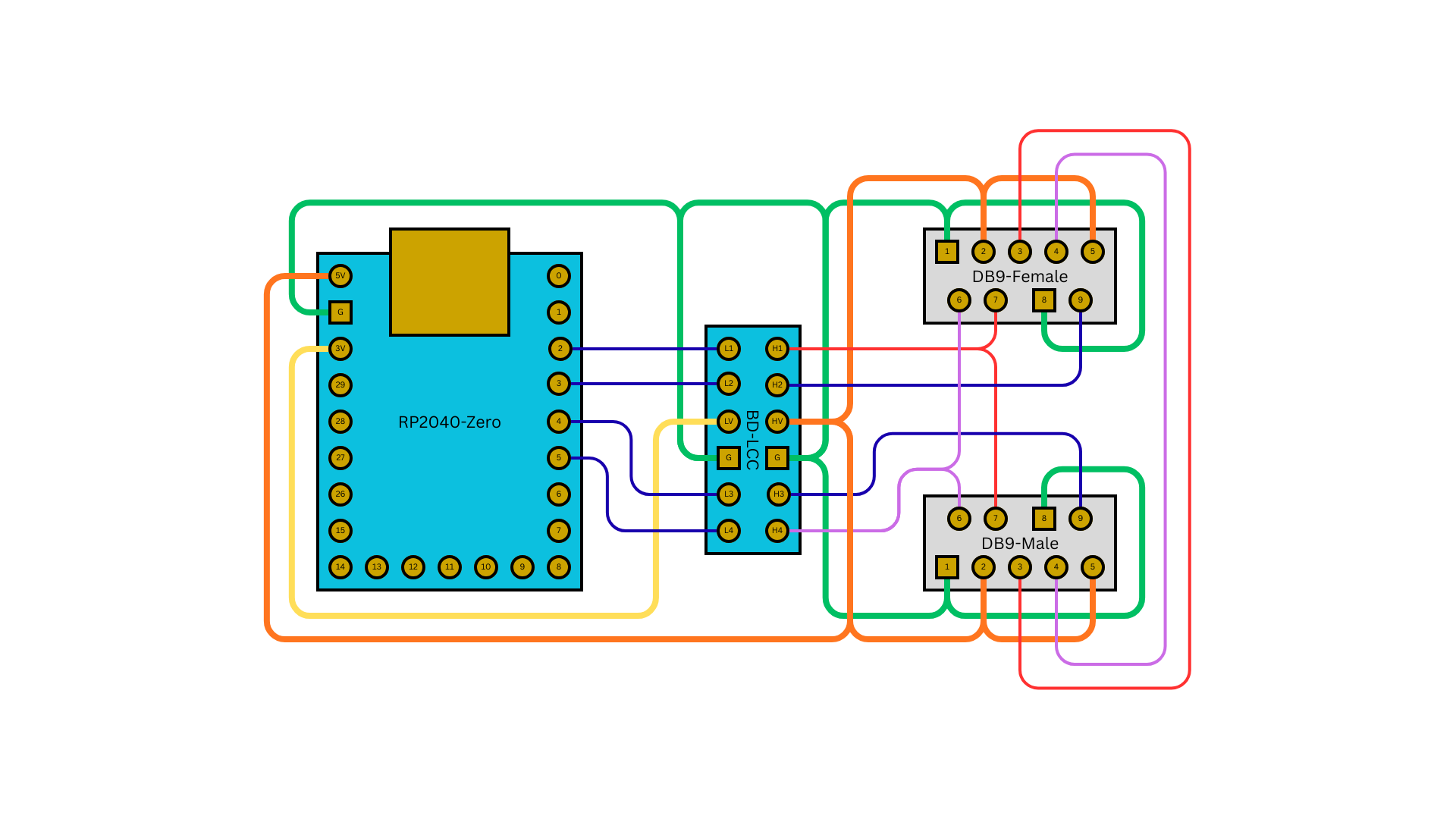
| RP2040-Zero | BD-LCC (Low) | BD-LCC (High) | DB9-Female | DB9-Male |
|---|---|---|---|---|
| 5V | - | HV | - | - |
| GND | G | G | - | - |
| GPIO 2 | L1 | H1 | Pin 1 | Pin 1 |
| GPIO 3 | L2 | H2 | Pin 2 | Pin 2 |
| GPIO 4 | LV | HV | - | - |
| GPIO 5 | G | G | Pin 6 | Pin 6 |
| GPIO 6 | L3 | H3 | Pin 3 | Pin 3 |
| GPIO 7 | L4 | H4 | Pin 4 | Pin 4 |
| - | - | - | Pin 5 (5V) | Pin 5 |
| - | - | - | Pin 9 (GND) | Pin 9 |
- DB9-Female: Connects to 3DO console
- DB9-Male: Passthrough for daisy-chaining native controllers
3DO Controller Port Pinout
Pin 1: Clock (CLK)
Pin 2: Data Out (to console)
Pin 3: Data In (from next controller)
Pin 4: Audio Left (unused)
Pin 5: Audio Right (unused)
Pin 6: VCC (5V)
Pin 7: GND
Pin 8: Control Select
3DO PBUS Protocol
The 3DO uses a serial PBUS (Peripheral Bus) protocol: - Clock-synchronized serial communication - Bidirectional data lines - Daisy chain architecture (up to 8 devices) - Different report sizes per device type: - Joypad: 2 bytes (16 bits) - Joystick: 9 bytes (72 bits) - Mouse: 4 bytes (32 bits)
Compatible 3DO Consoles
- Panasonic FZ-1 / FZ-10
- Goldstar GDO-101M / GDO-202M
- Sanyo TRY 3DO
- Creative Labs 3DO Blaster (PC card)
Compatible Games
Standard Controller:
- Road Rash
- Need for Speed
- Gex
- Crash 'n Burn
- Star Control II
- Return Fire
Fighting Games:
- Way of the Warrior
- Super Street Fighter II Turbo
Shooters:
- Doom
- PO'ed
- Killing Time
Mouse-Compatible:
- Myst
- The Horde
- Lemmings
Troubleshooting
Controller not detected: - Check PBUS cable connections - Verify 5V power supply - Check CLK and DATA pin assignments - Try reconnecting USB controller
Multiple players not working: - Verify USB hub is powered - Check total device count (max 8) - Try connecting one controller at a time
Extension passthrough not working: - Check DATA_IN connection - Verify daisy chain wiring - Native controller must be at end of chain
Mouse not working: - Verify game supports 3DO mouse - Check mouse is detected via USB - Try different USB mouse
Special Notes
- PBUS protocol uses PIO state machines for precise timing
- Extension passthrough allows mixing USB and native controllers
- Profile changes saved to flash (persists across power cycles)
- Based on USBTo3DO by FCare
Product Links
- USB-2-3DO Adapter - Pre-built hardware
- GitHub Releases - Latest firmware